Receiving new message
Flash only when receiving tagged messages:Teampel only flash when you receive message related to you.
Note:"Message related to you" means personal message or @ message.
Tab flashes when a message is received:Check this box, a prompt on the conversation list to the left will flash when receiving a new message.
Hide updates in project chat:Check this box to hide all update messages in project chat window.Please go to "Updates" in project to view all update messages.
Show only messages with @mentions on me:Once checked, it will show only messages with @mentions on me.If you want to view all update messages, please go to "Update" in the project.
Picture display
- Thumbnail:Message picture display thumbnail.
- Original picture:The message picture displays the original picture. If the message window width is smaller than the picture, which will be reduced to fit in.
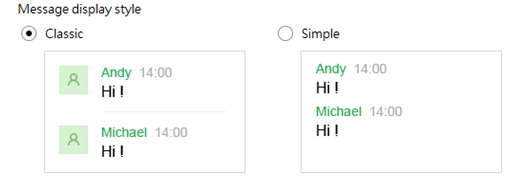
Message display style
Auto-reply
When your status is displayed as "Busy", the auto-reply message will be automatically send to who contacted you.Auto-reply message can be selected/edited from the below table.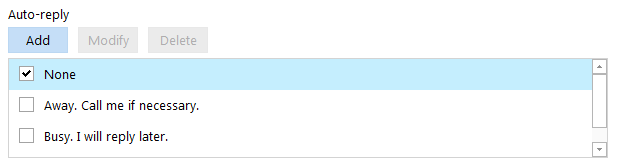
Image shown as the default Auto-reply message;Users can add, edit and delete the auto-reply messages.
Chat font setting
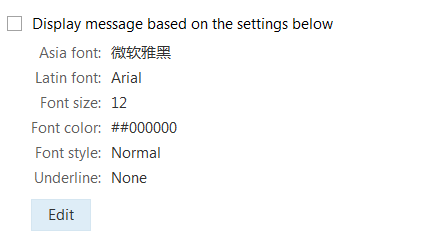
Click "Display received message based on the settings below" to apply the font style below to chat window.
Edit font style
- Click "Edit" to pop-out font setting window.
- Edit font style.
- Click "OK" to finish editing.